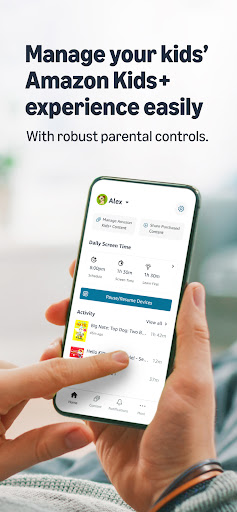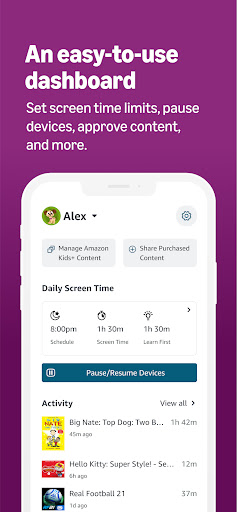
Amazon Kids+ Parent Dashboard
Entertainment- Category Entertainment
- Size 24.2MB
- Requirements Android 0 and up
- Downloads 310,000,000+
- Package Name com.amazon.tahoe.grownups
- Content Rating Everyone
About Amazon Kids+ Parent Dashboard Feature
The Amazon Kids+ Parent Dashboard is a dedicated parental control center designed to work seamlessly with the Amazon Kids+ subscription service. It provides parents and guardians with a centralized platform to manage their children's digital experiences across compatible Amazon Fire tablets, Kindle e-readers, and other supported devices. This dashboard empowers adults to curate content, set educational goals, monitor activity, and establish healthy screen time boundaries, all from their own smartphone or computer. It transforms a child's device into a safe, age-appropriate, and parent-guided environment for reading, watching, and playing.
Chapter 1: Function
The Amazon Kids+ Parent Dashboard delivers a comprehensive suite of management tools for parents. Its core function is content control, allowing adults to manually approve or block specific books, videos, apps, and games from the extensive Amazon Kids+ library. Parents can set daily time limits for overall device usage or for specific categories like games and videos, ensuring a balanced routine. The dashboard also provides detailed activity reports, showing what a child has been reading, watching, and for how long. Furthermore, it includes educational goal setting, where parents can assign specific reading targets. For younger children, parents can manage the Learn First feature, which restricts access to entertainment content until educational goals are met. The ability to add or remove content and adjust settings remotely offers continuous and convenient oversight without needing physical access to the child's device.
Chapter 2: Value
The primary value of the Amazon Kids+ Parent Dashboard lies in its ability to provide peace of mind and foster a constructive digital ecosystem for children. It shifts the dynamic from passive worry to active, informed participation in a child's media consumption. By offering granular control over content and screen time, it helps parents instill healthy digital habits early on, preventing overuse and encouraging a balanced mix of education and entertainment. The dashboard's detailed activity reports offer valuable insights into a child's interests and learning progress, enabling more meaningful conversations about their digital world. The educational goal-setting features add significant value by motivating children to read and learn, turning screen time into a productive endeavor. Unlike generic device settings, this dashboard is specifically tailored to the curated Amazon Kids+ universe, making management intuitive and effective. It saves parents the time and effort of manually vetting every piece of content, as the initial library is already age-appropriate, with the dashboard serving as a fine-tuning tool. This combination of control, insight, and educational reinforcement makes it an invaluable asset for modern parenting.
Chapter 3: Scenarios
The Amazon Kids+ Parent Dashboard is ideally suited for parents and guardians of children aged 3 to 12 who use Amazon Fire tablets or other supported devices. It is particularly valuable for families seeking a safe, managed introduction to digital content. A common scenario involves a parent setting up a new Fire Tablet for their 7-year-old; they use the dashboard to select appropriate books and educational apps, set a one-hour daily time limit, and block a cartoon series they deem unsuitable. For a parent of a reluctant reader, the dashboard's educational goals feature is instrumental; they can set a 20-minute daily reading goal and use the activity report to track progress and celebrate achievements. During long car rides or flights, a parent can temporarily grant extra screen time through the dashboard to keep their child occupied. It is also essential for monitoring older children's activity, allowing parents to see if they are exploring new educational topics or spending excessive time on games, facilitating discussions about responsible digital consumption.